

Transaction
It allows the creation of transactions and later check their status.
https://app.payku.cl/ (Default server) · https://des.payku.cl/ (Sandbox server)Generate a transaction
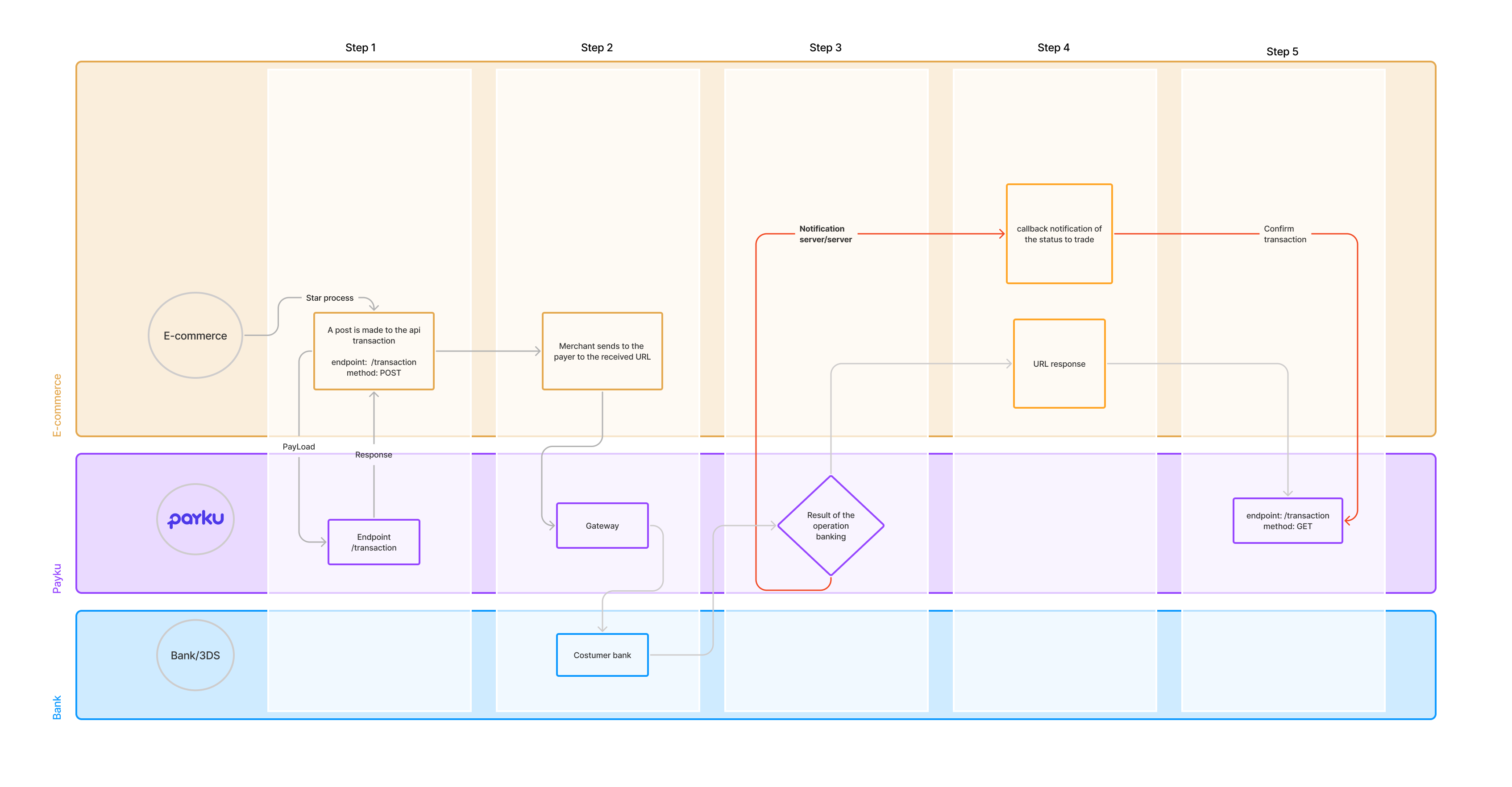
Section titled “Generate a transaction”/api/transactionThis method allows to create a payment order to Payku and receives as a response the URL to redirect the payer's browser and the token that identifies the transaction. Once the payer makes the successful payment, Payku will notify the result to the page of the business that was sent in the urlnotify parameter.
additional_parameters = allows sending additional information to be registered in payku associated with the transaction order_ext within additional_parameters, it is a reserved word, and it is useful to associate the transaction to a unique merchant identifier
Request body
| Parameter | Type | Description |
|---|---|---|
emailrequired |
string <email> | Client email. |
orderrequired |
string | Trade order. |
subjectrequired |
string | Description of the order. |
amountrequired |
float | Order amount. Important: if the amount includes decimals, it must be sent as a quoted string (for example, "150.50" instead of 150.50). |
currency |
string | Currency. |
payment |
integer | Identifier of the payment method. If the identifier is sent, the payer will be redirected directly to the indicated means of payment.
|
expired |
string | Date on which the transaction expires This field is not required. Allowed format (year-month-day hour:minute:second) Example: 2022-10-18 23:59:59 In case of being sent, it must comply with the following rules:
|
urlreturn |
string <url> | return url of the merchant where payku will redirect the payer after 3 seconds of obtaining the result of the transaction. |
urlnotify |
string <url> | Callback url of the business where payku will notify the payment.
|
additional_parameters |
object | Additional client parameters (Optional). |
parameters1 |
string | Name of the parameter given by the user payku |
parameters2 |
string | Name of the parameter given by the user payku |
order_ext |
string | Unique identifier provided by the merchant, which allows the transaction to be associated with an external identifier |
curl -X POST \https://BASE-URL/api/transaction \-H 'Accept: application/json, text/plain, */*' \-H 'Authorization: Bearer PUBLIC-TOKEN' \-H 'Content-Type: application/json' \-H 'Host: BASE-URL' \-d '{ "email": "[email protected]", "order": "987450011", "subject": "Test subject", "amount": "150.50", "currency": "PEN", "payment": 21, "expired": "2023-10-19 13:05:10", "urlreturn": "https://youwebsite.com/urlreturn?orderClient=98745", "urlnotify": "https://www.youwebsite.com/urlnotify?orderClient=98745", "additional_parameters": { "parameters1": "keyValue", "parameters2": "keyValue", "order_ext": "fff-777" }}'$client = new \GuzzleHttp\Client(); $body = $client->request('POST', 'https://BASE_URL/api/transaction', [ 'json' => [ 'order' => "987450011", 'subject' => 'Test subject', 'amount' => '150.50', 'currency'=> "PEN", 'payment' => 21, 'expired' => '2022-10-19 13:05:10', 'urlreturn' => 'https://youwebsite.com/urlreturn?orderClient=123', 'urlnotify' => 'https://youwebsite.com/urlnotify?orderClient=123', 'additional_parameters' => [ 'parameters1'=>'keyValue', 'parameters2'=>'keyValue2', 'order_ext'=>'fff-777' ] ], 'headers' => [ 'Authorization' => 'Bearer PUBLIC-TOKEN' ] ])->getBody();$response = json_decode($body);const request = async (data) => { const response = await fetch('https://BASE_URL/api/transaction', { method: 'POST', headers: { 'Content-Type': 'application/json', 'Authorization': 'Bearer PUBLIC-TOKEN' }, body: JSON.stringify(data) }); const result = await response.json(); console.log(result)}
let data = { order: "987450011", subject: "Test subject", amount: "150.50", currency: "PEN", payment: 21, expired: "2022-10-19 13:05:10", urlreturn: "https://youwebsite.com/urlreturn?orderClient=123", urlnotify: "https://youwebsite.com/urlnotify?orderClient=123", additional_parameters: { parameters1:"keyValue", parameters2:"keyValue2", order_ext:"fff-777" }};
request(data);Responses
{ "status": "pending", "id": "trx32cb779c0a777fc68", "url": "https://BASE-URL/payment_url", "hash": "00020000000000000111111222233339030226304E245", "qr_image": "data:image/png;base64,......"}Response fields
| Parameter | Type | Description |
|---|---|---|
status |
string | Transaction status. The possible statuses you can get are the following:
|
id |
string | Transaction identifier created by payku. |
url |
string | URL to redirect the user. |
hash |
string | Hash of the transaction to generate the QR. |
qr_image |
string | QR image. |
Request failed.
{ "status": "failed", "type": "Unprocessable Entity", "message_error": "subject:invalid,amount:is empty,email:is empty,order:invalid"}Response fields
| Parameter | Type | Description |
|---|---|---|
status |
string | Request status. |
type |
string | Type of error. |
message_error |
string | Error message. |
Incorrect public token.
{ "type": "Unauthorized", "message_error": { "error": "waiting token public" }}Response fields
| Parameter | Type | Description |
|---|---|---|
type |
string | Request status. |
message_error |
object | |
error |
string | Error message. |
Get the status of multiple payments
Section titled “Get the status of multiple payments”/api/transactionyou can filter the search for transactions depending on their status. for example. /api/transaction?success=true or to fetch multiple status /api/transaction?pending=true&rejected=true.
- date_init: indicates the date from which you want to start the transaction search, if this parameter is not sent the search will start with the current date.
- date_end: indicates the date where you want the transaction search to end, if this parameter is not sent, the search will have the current date as the end date.
- estatus: you can filter the search for transactions depending on their status. for example: /api/transaction?success=true or to bring multiple statuses /api/transaction?pending=true&rejected=true.
For pagination it is necessary to add the following at the end of the endpoint ?page=1&per_page=100 the first parameter being the page number and the second the number of records per page. In case you want to search for the transactions between the dates 01-09-2021 y 15-09-2021, also that they are only success status transactions, the url to use would be the following: https://[URL_BASE]/api/transaction?date_init=2021-09-01&date_end=2021-09-15&success=true.
curl -X GET \https://BASE-URL/api/transaction \-H 'Accept: application/json, text/plain, */*' \-H 'Authorization: Bearer PUBLIC-TOKEN' \-H 'Content-Type: application/json' \-H 'Host: BASE-URL' \$client = new \GuzzleHttp\Client(); $body = $client->request('GET', 'https://BASE_URL/api/transaction', [ 'headers' => [ 'Authorization' => 'Bearer PUBLIC-TOKEN' ] ])->getBody();$response = json_decode($body);const request = async () => { const response = await fetch('https://BASE_URL/api/transaction', { method: 'GET', headers: { 'Content-Type': 'application/json', 'Authorization': 'Bearer PUBLIC-TOKEN' }, }); const result = await response.json(); console.log(result)}
request();Responses
{ "transaction": [ { "id": "10ac494c1d8da71d98ea", "status": "success", "created_at": "2019-10-25 14:10:03", "amount": "98745", "order": "1572023402", "subject": "1572023402", "payment": { "start": "2020-12-16 15:10:33", "end": "2020-12-16 15:10:36", "media": "QR Interoperable", "transaction_id": "107999", "transaction_key": null, "deposit_date": "2022-10-05", "verification_key": "6669cbd982ef54c28f2f15fb9dc5262d", "authorization_code": "107742", "last_4_digits": "1233", "installments": 0, "card_type": "", "additional_parameters": { "identificador": "11.111.111-1", "banco": "Banco Estado", "numero_cuenta": "00126544977" }, "currency": "PEN" }, "nullify": { "status": "complete" }, "gateway_response": { "status": "success", "message": "successful transaction" } } ]}Response fields
| Parameter | Type | Description |
|---|---|---|
transaction |
array of objects | |
id |
string | Identifier of the transaction created by Payku. |
status |
string | Transaction status The possible statuses you can get are the following:
|
created_at |
string | Registration date. |
email |
string | User email. |
amount |
string | Amount. |
order |
string | Order number. |
subject |
string | Description of the purchase order. |
payment |
object | |
start |
string | Start transaction. |
end |
string | End transaction. |
media |
string | Payment method, used by the user. |
transaction_id |
string | Identifier of the transaction created by payku. |
transaction_key |
string | Transaction identifier created by Payku. |
deposit_date |
string | Date on which the deposit will be made to the client. |
verification_key |
string | Verification code created by Payku. |
authorization_code |
string | Authorization code. |
last_4_digits |
string | Last 4 digits of the affiliated card. |
installments |
int | installments. |
card_type |
string | Card type. |
additional_parameters |
object | Example of additional parameters that Payku can send. |
identificador |
string | Example of transaction identifier: |
banco |
string | Example of bank where the transaction was made: |
numero_cuenta |
string | Example of account number in which the transaction was made: |
currency |
string | Currency. |
nullify |
object | Object containing abort response information |
status |
string | Cancellation status. The possible statuses you can get are as follows:
|
gateway_response |
object | Object containing transaction response information |
status |
string | Transaction status The possible statuses you can get are the following:
|
message |
string | Message describing the status.
|
Request error.
{ "status": "failed", "type": "Unprocessable Entity", "message_error": "subject:invalid,amount:is empty,email:is empty,order:invalid"}Response fields
| Parameter | Type | Description |
|---|---|---|
status |
string | Request status. |
type |
string | Type of error. |
message_error |
string | Error message. |
Wrong Public Token.
{ "type": "Unauthorized", "message_error": { "error": "waiting token public" }}Response fields
| Parameter | Type | Description |
|---|---|---|
type |
string | Request status. |
message_error |
object | |
error |
string | Error message. |
Identifier does not exist.
{ "status": "failed", "type": "Not Found", "id": "is not valid"}Response fields
| Parameter | Type | Description |
|---|---|---|
status |
string | Request status. |
type |
string | Type of error. |
id |
string | Id information |
Get status of a payment
Section titled “Get status of a payment”/api/transaction/{idTransaction}This method allows you to obtain the information of a payment made in Payku
Path parameters
| Parameter | Type | Description |
|---|---|---|
idrequired |
string | id of the transaction to request |
curl -X GET \https://BASE-URL/api/transaction/ID-IDENTIFICADOR \-H 'Accept: application/json, text/plain, */*' \-H 'Authorization: Bearer PUBLIC-TOKEN' \-H 'Content-Type: application/json' \-H 'Host: BASE-URL' \$client = new \GuzzleHttp\Client(); $body = $client->request('GET', 'https://BASE_URL/api/transaction/10ac494c1d8da71d98ea', [ 'headers' => [ 'Authorization' => 'Bearer PUBLIC-TOKEN' ] ])->getBody();$response = json_decode($body);const request = async () => { const response = await fetch('https://BASE_URL/api/transaction/10ac494c1d8da71d98ea', { method: 'GET', headers: { 'Content-Type': 'application/json', 'Authorization': 'Bearer PUBLIC-TOKEN' }, }); const result = await response.json(); console.log(result)}
request();Responses
{ "status": "success", "id": "10ac494c1d8da71d98ea", "created_at": "2019-10-25 14:10:03", "order": "1572023402", "subject": "1572023402", "amount": "98745", "payment": { "start": "2020-12-16 15:10:33", "end": "2020-12-16 15:10:36", "media": "QR Interoperable", "transaction_id": "107999", "transaction_key": null, "deposit_date": "2022-10-05", "verification_key": "6669cbd982ef54c28f2f15fb9dc5262d", "authorization_code": "107742", "last_4_digits": "1233", "installments": 0, "card_type": "", "additional_parameters": { "identificador": "11.111.111-1", "banco": "Banco Estado", "numero_cuenta": "00126544977", "network": { "ip_address": "192.0.2.123" } }, "currency": "PEN" }, "nullify": { "status": "complete" }, "gateway_response": { "status": "success", "message": "successful transaction" }}Response fields
| Parameter | Type | Description |
|---|---|---|
status |
string | Transaction status The possible statuses you can get are the following:
|
id |
string | Transaction identifier created by Payku. |
created_at |
string | Registration date. |
order |
string | Number of order. |
email |
string | Client email. |
subject |
string | Description of the purchase order. |
amount |
string | Amount. |
payment |
object | |
start |
string | Start of the transaction. |
end |
string | End of transaction. |
media |
string | Payment method, used by the user. |
transaction_id |
string | Identifier of the transaction created by payku. |
transaction_key |
string | Transaction identifier created by Payku. |
deposit_date |
string | Date on which the deposit will be made to the client. |
verification_key |
string | Verification code created by Payku. |
authorization_code |
string | Authorization code. |
last_4_digits |
string | Last 4 digits of the affiliated card. |
installments |
int | installments. |
card_type |
string | Card type. |
additional_parameters |
object | Example of additional parameters that Payku can send. |
identificador |
string | Example of transaction identifier: |
banco |
string | Example of bank where the transaction was made: |
numero_cuenta |
string | Example of account number in which the transaction was made: |
network |
object | User network data: |
ip_address |
string | Example of IP Address of the user: |
currency |
string | Currency. |
nullify |
object | Objeto que contiene información de la respuesta de la anulación |
status |
string | Estatus de anulación. Los posibles estados que puede obtener son los siguientes:
|
gateway_response |
object | Object containing transaction response information |
status |
string | Transaction status The possible statuses you can get are the following:
|
message |
string | Message describing the status.
|
Request failed.
{ "status": "failed", "type": "Unprocessable Entity", "message_error": "subject:invalid,amount:is empty,email:is empty,order:invalid"}Response fields
| Parameter | Type | Description |
|---|---|---|
status |
string | Request status. |
type |
string | Type of error. |
message_error |
string | Error message. |
Incorrect public token.
{ "type": "Unauthorized", "message_error": { "error": "waiting token public" }}Response fields
| Parameter | Type | Description |
|---|---|---|
type |
string | Request status. |
message_error |
object | |
error |
string | Error message. |
Identifier does not exist.
{ "status": "failed", "type": "Not Found", "id": "is not valid"}Response fields
| Parameter | Type | Description |
|---|---|---|
status |
string | Request status. |
type |
string | Type of error. |
id |
string | Id information |