# Payku API — 🇵🇪 Peru (EN)

> Official Payku API documentation for Peru, auto-generated from the OpenAPI specification (v2.1.01). Source: https://docs.payku.com/ · Sandbox: https://des.payku.cl/

Base URL: `https://app.payku.cl/` (Default server) · `https://des.payku.cl/` (Sandbox server)

## Introduction

Welcome to the Payku API. You can use our API to access the different
Payku endpoints, where you can generate and manage payments through different
methods and get information from them.

The API is organized around REST. It has predictable URLs and resource-oriented,
and uses HTTP response codes to indicate the result of the call. All API
responses return objects JSON, including errors.

User should look for a 200 result code. If received any result code other
than 200, the request, or the response is invalid, which means that the fields
did not pass the checks of validation from payku. We use features included in
the HTTP protocol, such as authentication, which are supported by the most HTTP
clients.

**Important — How to tell if an operation failed**

Do not rely only on the HTTP status code (for example, 200). In our API, many
error responses also return HTTP 200. This is intentional and part of how the
API is designed.

Always read the JSON response body and check the `status` field:
- If `status` is `"success"`, the operation completed successfully.
- If `status` is `"failed"`, there was an error (for example, invalid data or a
  rejected operation). Also check the error message included in the same response.

## Authentication

Payku uses Token Based Authentication over HTTPS for authentication. To have
access to our API, access your account in the section of Integration you will
find the option of integration and API tokens. The request Unauthenticated or
incorrect will return an Invalid token response.

## API Security

Each request is required to have included in the header:
  - Authorization: Bearer **TOKEN-PÚBLICO**

## Signature

In the case of the subscription, nullification and Mall API, an additional layer of security was added
through of a signature that is sent in the request header, to obtain said signature
is necessary the following:

The Request Path must be concatenated in url format along with all the request
parameters, which must be ordered alphabetically by key, such that key = value.
Therefore, if the client email value is "example@domain.com" the correct format
would be "example%40domain.com" and then concatenated with the character '&'.

Once the character sets are ordered and concatenated, the hash is calculated
using the HMAC function with encryption type sha256, and the private token.

**Note:** If an element of the data has as value an object or array, it is excluded from the data. This function is in the PHP and Javascript example.

### PHP Example
API Endpoint:
```php
$request_path = urlencode('/api/suclient');
```
Sorting the parameters:
```php
$data = [
  'email' => 'support@youwebsite.cl',
  'name' => 'Joe Doe',
  'phone' => '923122312',
  'address' => 'Moneda 101',
  'country' => 'Chile',
  'region' => 'Metropolitana',
  'city' => 'Santiago',
  'postal_code' => '850000',
  'additional_parameters' => [
    'parameter_1' => 'example',
    'parameter_2' => 'example 2',
  ]
];
ksort($data);
```
Transformation of the parameters to url format:
```php
    $contador = 0;
    $concatenar = null;

    if (!empty($data) && !is_null($data)) {
        foreach ($data as $key => $val) {
            if(gettype($val)!='array' && gettype($val)!='object'){
                if ($contador>0) {
                    $concatenar .= '&';
                }
                $concatenar .= $key . '=' . urlencode($val);
                $contador++;
            }
        }
    };
```
Concatenation of the parameters in url format with the API endpoint:
```php
$concat = $request_path.'&'.$concatenar;
```
Sign:
```php
$sign = hash_hmac('sha256', $concat, 'fe551abcef62fcf002dc598922e68f0a');
```

### JavaScript Example
Import CryptoJS dependency:
```javascript
const CryptoJS = require("crypto-js");
```
API Endpoint:
```javascript
const requestPath = encodeURIComponent('/api/suclient');
```
Sorting the parameters:
```javascript
const data = {
  email: "support@youwebsite.cl",
  name: "Joe Doe",
  phone: "923122312",
  address: "Moneda 101",
  country: "Chile",
  region: "Metropolitana",
  city: "Santiago",
  postal_code: "850000"
};
const orderedData = {};
Object.keys(data).sort().forEach(function(key) {
  orderedData[key] = data[key];
  if (typeof orderedData[key] === 'object') {
        delete orderedData[key];
  }
});
```
Transformation of the parameters to url format:
```javascript
const arrayConcat = new URLSearchParams(orderedData).toString();
```
Concatenation of the parameters in url format with the API endpoint:
```javascript
const concat = requestPath + "&" + arrayConcat;
```
Sign:
```javascript
const sign = CryptoJS.HmacSHA256(concat, "fe551abcef62fcf002dc598922e68f0a").toString();
```

The result of the signature obtained for both examples is:

```javascript
"d891663698d31aa8b68babe96ac6497f5a0d874024368102998d5b79a4d12c36"
```

## Errors

Payku uses conventional HTTP responses to indicate the success or failure of a request.
In general, codes in the 2xx range indicate success, codes in the 4xx range indicate
an error that failed due to the information provided (ex: a required parameter was
skipped, a payment failed, etc.), and codes in the 5xx range indicate an error with
Payku servers (these are rare).

## Error codes
<div class="errorContent">
<table>
  <tbody>
    <tr>
      <td style="text-align: right"><strong class="errorTitle">400</strong>
        <p class="psmall">Bad Request</p>
      </td>
      <td class="errorDescription">There is a problem with your request</td>
    </tr>
    <tr>
      <td style="text-align: right"><strong class="errorTitle">401</strong>
        <p class="psmall">Unauthorized</p>
      </td>
      <td class="errorDescription">Your token is incorrect or signature is incorrect</td>
    </tr>
    <tr>
      <td style="text-align: right"><strong class="errorTitle">403</strong>
        <p class="psmall">Forbidden</p>
      </td>
      <td class="errorDescription">You do not have permission to view this page</td>
    </tr>
    <tr>
      <td style="text-align: right"><strong class="errorTitle">404</strong>
        <p class="psmall">Not Found</p>
      </td>
      <td class="errorDescription">The specified resource was not found</td>
    </tr>
    <tr>
      <td style="text-align: right"><strong class="errorTitle">405</strong>
        <p class="psmall">Method Not Allowed</p>
      </td>
      <td class="errorDescription">You tried to enter a resource with an invalid method</td>
    </tr>
    <tr>
      <td style="text-align: right"><strong class="errorTitle">406</strong>
        <p class="psmall">Not Acceptable</p>
      </td>
      <td class="errorDescription">You requested a format other than JSON</td>
    </tr>
    <tr>
      <td style="text-align: right"><strong class="errorTitle">410</strong>
        <p class="psmall">Gone</p>
      </td>
      <td class="errorDescription">The requested resource was removed from our servers</td>
    </tr>
    <tr>
      <td style="text-align: right"><strong class="errorTitle">422</strong>
        <p class="psmall">Unprocessable Entity</p>
      </td>
      <td class="errorDescription">We cannot process your request, please review it.</td>
    </tr>
    <tr>
      <td style="text-align: right"><strong class="errorTitle">429</strong>
        <p class="psmall">Too Many Requests</p>
      </td>
      <td class="errorDescription">You are requesting a lot of resources! Stop!</td>
    </tr>
    <tr>
      <td style="text-align: right"><strong class="errorTitle">500</strong>
        <p class="psmall">Internal Server Error</p>
      </td>
      <td class="errorDescription">We had a problem with our server. Please try again later.</td>
    </tr>
    <tr>
      <td style="text-align: right"><strong class="errorTitle">503</strong>
        <p class="psmall">Service Unavailable</p>
      </td>
      <td class="errorDescription">We are offline for maintenance. Please try again later.</td>
    </tr>
  </tbody>
</table>
</div>

## API access

If you have a payku account, you can access the REST API through the following endpoints:

<div class="content">
  <table class="center smallTable">
    <thead>
      <tr>
        <th style="text-align:center;"><strong>Site</strong></th>
        <th style="text-align:center;"><strong>BASE URL FOR REST ENDPOINT</strong></th>
      </tr>
    </thead>
    <tbody>
      <tr>
        <td><strong>Production</strong></td>
        <td align="center"><a href="https://app.payku.cl/api">https://app.payku.cl/api</a></td>
      </tr>
      <tr>
        <td><strong>Sandbox</strong></td>
        <td><a href="https://des.payku.cl/api">https://des.payku.cl/api</a></td>
      </tr>
    </tbody>
  </table>
</div>

- **Production**: provides direct access to generate actual transactions.
- **Sandbox**: allows you to test your integration without affecting the actual data.

When the authentication form with DNI and password appears, DNI 11111111 and password 123 must be used.

## Transaction

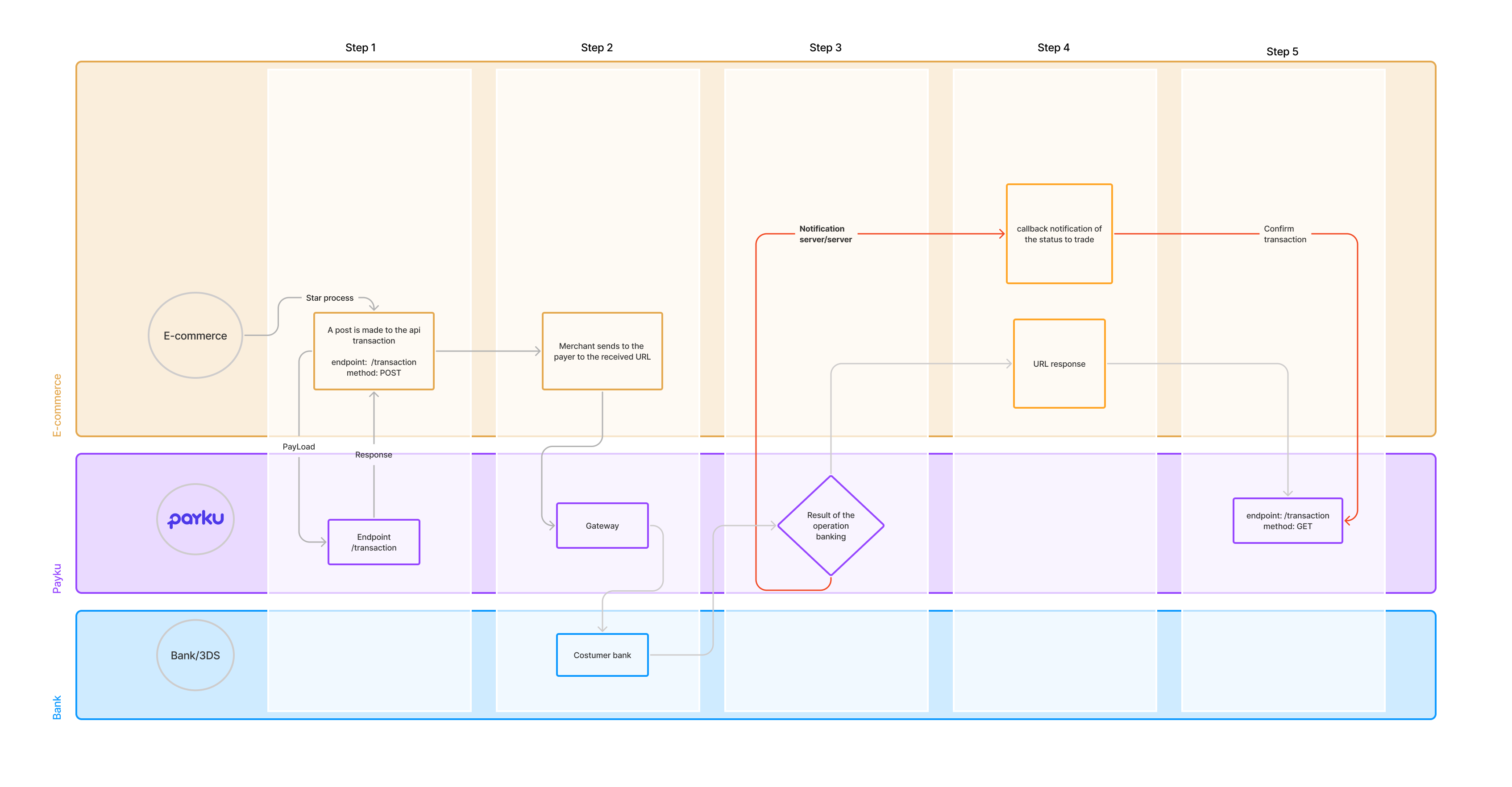
It allows the creation of transactions and later check their status.
<br>
<div class='container'>
  <img src='https://docs.payku.com/img/diagrams/Diagram-Transaction.png' alt='Avatar' class='image' style='width:100%'>
  <div class='middle'>
    <a target='_blank' href='https://docs.payku.com/img/diagrams/Diagram-Transaction.png' class='text'>View</a>
  </div>
</div>

### Generate a transaction

`POST /api/transaction`

This method allows to create a payment order to **Payku** and receives as a response the **URL** to redirect the payer's browser and the **token** that identifies the transaction.
Once the payer makes the successful payment, **Payku** will notify the result to the page of the business that was sent in the **urlnotify** parameter.

**additional_parameters** = allows sending additional information to be registered in payku associated with the transaction **order_ext** within additional_parameters, it is a reserved word, and it is useful to associate the transaction to a unique merchant identifier

**Request body**

| Field | Type | Required | Description |
| --- | --- | --- | --- |
| `email` | string | ✓ | Client email. — maximum 100 characters — Example: `joedoe@gmail.com` |
| `order` | string | ✓ | Trade order. — maximum 40 characters — Example: `987450011` |
| `subject` | string | ✓ | Description of the order. — maximum 2000 characters — Example: `Test subject` |
| `amount` | float | ✓ | Order amount. **Important:** if the amount includes decimals, it must be sent as a quoted string (for example, "150.50" instead of 150.50). — maximum 14 digits — Example: `150.50` |
| `currency` | string |  | Currency. — maximum 6 characters — Example: `PEN` |
| `payment` | integer |  | Identifier of the payment method. If the identifier is sent, the payer will be redirected directly to the indicated means of payment. - 21 QR Interoperable (Yape, Plin and Others; PEN Currency) - 25 Débito, Crédito, Mastercard, Visa y Diners Club — maximum 2 characters — Example: `21` |
| `expired` | string |  | Date on which the transaction expires **This field is not required.** Allowed format (year-month-day hour:minute:second) Example: 2022-10-18 23:59:59 In case of being sent, it must comply with the following rules: - It must be greater than 5 minutes from the current date (Santiago time). - urlreturn is required, it will be attached as parameters GET /?message_error=expired&id=trx60dc327d9e4c094 — Example: `2022-10-19 13:05:10` |
| `urlreturn` | string |  | return url of the merchant where payku will redirect the payer after 3 seconds of obtaining the result of the transaction. — maximum 200 characters — Example: `https://youwebsite.com/urlreturn?orderClient=123` |
| `urlnotify` | string |  | Callback url of the business where payku will notify the payment. - Note: After the client completes the payment process at their bank, payku will automatically respond to the endpoint entered in urlnotify the result of the banking operation. - **Approved Example:** - { - "transaction_id": "9916587765599311", - "payment_key" : "trx32cb779c0a777fc68", - "transaction_key" : "9916581777599311", - "verification_key": "8b3e2202fb086a7de93777ae34d5e18c", - "order": "199", - "status": "success" - } - **Rejected Example:** - { - "transaction_id": "9916587765599311", - "payment_key" : "trx32cb779c0a777fc68", - "transaction_key" : "9916581777599311", - "verification_key": "8b3e2202fb086a7de93777ae34d5e18c", - "order": "199", - "status": "failed" - } — maximum 600 characters — Example: `https://youwebsite.com/urlnotify?orderClient=123` |
| `additional_parameters` | object |  | Additional client parameters (Optional). — maximum 4000 characters |
| ↳ `parameters1` | string |  | Name of the parameter given by the user payku — Example: `keyValue` |
| ↳ `parameters2` | string |  | Name of the parameter given by the user payku — Example: `keyValue2` |
| ↳ `order_ext` | string |  | Unique identifier provided by the merchant, which allows the transaction to be associated with an external identifier — Example: `fff-777` |

**cURL**

```bash
curl -X POST \
https://BASE-URL/api/transaction \
-H 'Accept: application/json, text/plain, */*' \
-H 'Authorization: Bearer PUBLIC-TOKEN' \
-H 'Content-Type: application/json' \
-H 'Host: BASE-URL' \
-d '{
  "email": "johndoe@example.com",
  "order": "987450011",
  "subject": "Test subject",
  "amount": "150.50",
  "currency": "PEN",
  "payment": 21,
  "expired": "2023-10-19 13:05:10",
  "urlreturn": "https://youwebsite.com/urlreturn?orderClient=98745",
  "urlnotify": "https://www.youwebsite.com/urlnotify?orderClient=98745",
  "additional_parameters": {
    "parameters1": "keyValue",
    "parameters2": "keyValue",
    "order_ext": "fff-777"
  }
}'
```

**PHP**

```php
$client = new \GuzzleHttp\Client();
  $body = $client->request('POST', 'https://BASE_URL/api/transaction', [
    'json' => [
      'email' => 'johndoe@example.com',
      'order' => "987450011",
      'subject' => 'Test subject',
      'amount' => '150.50',
      'currency'=> "PEN",
      'payment' => 21,
      'expired' => '2022-10-19 13:05:10',
      'urlreturn' => 'https://youwebsite.com/urlreturn?orderClient=123',
      'urlnotify' => 'https://youwebsite.com/urlnotify?orderClient=123',
        'additional_parameters' => [
          'parameters1'=>'keyValue',
          'parameters2'=>'keyValue2',
          'order_ext'=>'fff-777'
        ]
      ],
    'headers' => [
      'Authorization' => 'Bearer PUBLIC-TOKEN'
    ]
  ])->getBody();
$response = json_decode($body);
```

**JS**

```js
const request = async (data) => {
  const response = await fetch('https://BASE_URL/api/transaction', {
    method: 'POST',
    headers: {
      'Content-Type': 'application/json',
      'Authorization': 'Bearer PUBLIC-TOKEN'
    },
    body: JSON.stringify(data)
  });
  const result = await response.json();
  console.log(result)
}

let data = {
  email: "johndoe@example.com",
  order: "987450011",
  subject: "Test subject",
  amount: "150.50",
  currency: "PEN",
  payment: 21,
  expired: "2022-10-19 13:05:10",
  urlreturn: "https://youwebsite.com/urlreturn?orderClient=123",
  urlnotify: "https://youwebsite.com/urlnotify?orderClient=123",
  additional_parameters: {
    parameters1:"keyValue",
    parameters2:"keyValue2",
    order_ext:"fff-777"
  }
};

request(data);
```

**Responses**

*200*

```json
{
  "status": "pending",
  "id": "trx32cb779c0a777fc68",
  "url": "https://BASE-URL/payment_url",
  "hash": "00020000000000000111111222233339030226304E245",
  "qr_image": "data:image/png;base64,......"
}
```

| Field | Type | Required | Description |
| --- | --- | --- | --- |
| `status` | string |  | Transaction status. The possible statuses you can get are the following: - register - pending - success - rejected - refunded partial - refunded — Example: `pending` |
| `id` | string |  | Transaction identifier created by payku. — Example: `trx32cb779c0a777fc68` |
| `url` | string |  | URL to redirect the user. — Example: `https://BASE-URL/payment_url` |
| `hash` | string |  | Hash of the transaction to generate the QR. — Example: `00020000000000000111111222233339030226304E245` |
| `qr_image` | string |  | QR image. — Example: `data:image/png;base64,......` |

*400* — Request failed.

```json
{
  "status": "failed",
  "type": "Unprocessable Entity",
  "message_error": "subject:invalid,amount:is empty,email:is empty,order:invalid"
}
```

| Field | Type | Required | Description |
| --- | --- | --- | --- |
| `status` | string |  | Request status. — Example: `failed` |
| `type` | string |  | Type of error. — Example: `Unprocessable Entity` |
| `message_error` | string |  | Error message. — Example: `subject:invalid,amount:is empty,email:is empty,order:invalid` |

*401* — Incorrect public token.

```json
{
  "type": "Unauthorized",
  "message_error": {
    "error": "waiting token public"
  }
}
```

| Field | Type | Required | Description |
| --- | --- | --- | --- |
| `type` | string |  | Request status. — Example: `Unauthorized` |
| `message_error` | object |  |  |
| ↳ `error` | string |  | Error message. — Example: `waiting token public` |

### Get the status of multiple payments

`GET /api/transaction`

you can filter the search for transactions depending on their status. for example. /api/transaction?success=true or to fetch multiple status /api/transaction?pending=true&rejected=true.
  - date_init: indicates the date from which you want to start the transaction search, if this parameter is not sent the search will start with the current date.
  - date_end: indicates the date where you want the transaction search to end, if this parameter is not sent, the search will have the current date as the end date.
  - estatus: you can filter the search for transactions depending on their status. for example: /api/transaction?success=true or to bring multiple statuses /api/transaction?pending=true&rejected=true.

For pagination it is necessary to add the following at the end of the endpoint ?page=1&per_page=100 the first parameter being the page number and the second the number of records per page. In case you want to search for the transactions between the dates 01-09-2021 y 15-09-2021, also that they are only success status transactions, the url to use would be the following:  https://[URL_BASE]/api/transaction?date_init=2021-09-01&date_end=2021-09-15&success=true.

**CURL**

```text
curl -X GET \
https://BASE-URL/api/transaction  \
-H 'Accept: application/json, text/plain, */*' \
-H 'Authorization: Bearer PUBLIC-TOKEN' \
-H 'Content-Type: application/json' \
-H 'Host: BASE-URL' \
```

**PHP**

```php
$client = new \GuzzleHttp\Client();
  $body = $client->request('GET', 'https://BASE_URL/api/transaction', [
    'headers' => [
      'Authorization' => 'Bearer PUBLIC-TOKEN'
    ]
  ])->getBody();
$response = json_decode($body);
```

**JS**

```js
const request = async () => {
  const response = await fetch('https://BASE_URL/api/transaction', {
    method: 'GET',
    headers: {
      'Content-Type': 'application/json',
      'Authorization': 'Bearer PUBLIC-TOKEN'
    },
  });
  const result = await response.json();
  console.log(result)
}

request();
```

**Responses**

*200*

```json
{
  "transaction": [
    {
      "id": "10ac494c1d8da71d98ea",
      "status": "success",
      "created_at": "2019-10-25 14:10:03",
      "email": "alex@onequark.com",
      "amount": "98745",
      "order": "1572023402",
      "subject": "1572023402",
      "payment": {
        "start": "2020-12-16 15:10:33",
        "end": "2020-12-16 15:10:36",
        "media": "QR Interoperable",
        "transaction_id": "107999",
        "transaction_key": null,
        "deposit_date": "2022-10-05",
        "verification_key": "6669cbd982ef54c28f2f15fb9dc5262d",
        "authorization_code": "107742",
        "last_4_digits": "1233",
        "installments": 0,
        "card_type": "",
        "additional_parameters": {
          "identificador": "11.111.111-1",
          "banco": "Banco Estado",
          "numero_cuenta": "00126544977"
        },
        "currency": "PEN"
      },
      "nullify": {
        "status": "complete"
      },
      "gateway_response": {
        "status": "success",
        "message": "successful transaction"
      }
    }
  ]
}
```

| Field | Type | Required | Description |
| --- | --- | --- | --- |
| `transaction` | array of objects |  |  |
| ↳ `id` | string |  | Identifier of the transaction created by Payku. — Example: `10ac494c1d8da71d98ea` |
| ↳ `status` | string |  | Transaction status The possible statuses you can get are the following: - register - pending - success - rejected — Example: `success` |
| ↳ `created_at` | string |  | Registration date. — Example: `2019-10-25 14:10:03` |
| ↳ `email` | string |  | User email. — Example: `alex@onequark.com` |
| ↳ `amount` | string |  | Amount. — Example: `98745` |
| ↳ `order` | string |  | Order number. — Example: `1572023402` |
| ↳ `subject` | string |  | Description of the purchase order. — Example: `1572023402` |
| ↳ `payment` | object |  |  |
| ↳ ↳ `start` | string |  | Start transaction. — Example: `2020-12-16 15:10:33` |
| ↳ ↳ `end` | string |  | End transaction. — Example: `2020-12-16 15:10:36` |
| ↳ ↳ `media` | string |  | Payment method, used by the user. — Example: `QR Interoperable` |
| ↳ ↳ `transaction_id` | string |  | Identifier of the transaction created by payku. — Example: `107999` |
| ↳ ↳ `transaction_key` | string |  | Transaction identifier created by Payku. |
| ↳ ↳ `deposit_date` | string |  | Date on which the deposit will be made to the client. — Example: `2022-10-05` |
| ↳ ↳ `verification_key` | string |  | Verification code created by Payku. — Example: `6669cbd982ef54c28f2f15fb9dc5262d` |
| ↳ ↳ `authorization_code` | string |  | Authorization code. — Example: `107742` |
| ↳ ↳ `last_4_digits` | string |  | Last 4 digits of the affiliated card. — Example: `1233` |
| ↳ ↳ `installments` | int |  | installments. — Example: `0` |
| ↳ ↳ `card_type` | string |  | Card type. — Example: `` |
| ↳ ↳ `additional_parameters` | object |  | **Example** of additional parameters that Payku can send. |
| ↳ ↳ ↳ `identificador` | string |  | **Example** of transaction identifier: — Example: `11.111.111-1` |
| ↳ ↳ ↳ `banco` | string |  | **Example** of bank where the transaction was made: — Example: `Banco Estado` |
| ↳ ↳ ↳ `numero_cuenta` | string |  | **Example** of account number in which the transaction was made: — Example: `00126544977` |
| ↳ ↳ `currency` | string |  | Currency. — Example: `PEN` |
| ↳ `nullify` | object |  | Object containing abort response information |
| ↳ ↳ `status` | string |  | Cancellation status. The possible statuses you can get are as follows: - pending - awaiting_funds - waiting_bank_details - complete - reverse_deleted - reverse_completed - reverse_deleted — Example: `complete` |
| ↳ `gateway_response` | object |  | Object containing transaction response information |
| ↳ ↳ `status` | string |  | Transaction status The possible statuses you can get are the following: - pending - success - rejected - refunded partial - refunded — Example: `success` |
| ↳ ↳ `message` | string |  | Message describing the status. - successful transaction - Transaction rejected. - Transaction must be retried. - Error transaction. - Rate Error Rejection. - Exceeds maximum monthly quota. - Exceeds daily limit per transaction. - unauthorized item. — Example: `successful transaction` |

*400* — Request error.

```json
{
  "status": "failed",
  "type": "Unprocessable Entity",
  "message_error": "subject:invalid,amount:is empty,email:is empty,order:invalid"
}
```

| Field | Type | Required | Description |
| --- | --- | --- | --- |
| `status` | string |  | Request status. — Example: `failed` |
| `type` | string |  | Type of error. — Example: `Unprocessable Entity` |
| `message_error` | string |  | Error message. — Example: `subject:invalid,amount:is empty,email:is empty,order:invalid` |

*401* — Wrong Public Token.

```json
{
  "type": "Unauthorized",
  "message_error": {
    "error": "waiting token public"
  }
}
```

| Field | Type | Required | Description |
| --- | --- | --- | --- |
| `type` | string |  | Request status. — Example: `Unauthorized` |
| `message_error` | object |  |  |
| ↳ `error` | string |  | Error message. — Example: `waiting token public` |

*404* — Identifier does not exist.

```json
{
  "status": "failed",
  "type": "Not Found",
  "id": "is not valid"
}
```

| Field | Type | Required | Description |
| --- | --- | --- | --- |
| `status` | string |  | Request status. — Example: `failed` |
| `type` | string |  | Type of error. — Example: `Not Found` |
| `id` | string |  | Id information — Example: `is not valid` |

### Get status of a payment

`GET /api/transaction/{idTransaction}`

This method allows you to obtain the information of a payment made in **Payku**

**Path parameters**

| Field | Type | Required | Description |
| --- | --- | --- | --- |
| `id` | string | ✓ | id of the transaction to request — maximum 30 characters |

**CURL**

```text
curl -X GET \
https://BASE-URL/api/transaction/ID-IDENTIFICADOR  \
-H 'Accept: application/json, text/plain, */*' \
-H 'Authorization: Bearer PUBLIC-TOKEN' \
-H 'Content-Type: application/json' \
-H 'Host: BASE-URL' \
```

**PHP**

```php
$client = new \GuzzleHttp\Client();
  $body = $client->request('GET', 'https://BASE_URL/api/transaction/10ac494c1d8da71d98ea', [
    'headers' => [
      'Authorization' => 'Bearer PUBLIC-TOKEN'
    ]
  ])->getBody();
$response = json_decode($body);
```

**JS**

```js
const request = async () => {
  const response = await fetch('https://BASE_URL/api/transaction/10ac494c1d8da71d98ea', {
    method: 'GET',
    headers: {
      'Content-Type': 'application/json',
      'Authorization': 'Bearer PUBLIC-TOKEN'
    },
  });
  const result = await response.json();
  console.log(result)
}

request();
```

**Responses**

*200*

```json
{
  "status": "success",
  "id": "10ac494c1d8da71d98ea",
  "created_at": "2019-10-25 14:10:03",
  "order": "1572023402",
  "email": "support@youwebsite.cl",
  "subject": "1572023402",
  "amount": "98745",
  "payment": {
    "start": "2020-12-16 15:10:33",
    "end": "2020-12-16 15:10:36",
    "media": "QR Interoperable",
    "transaction_id": "107999",
    "transaction_key": null,
    "deposit_date": "2022-10-05",
    "verification_key": "6669cbd982ef54c28f2f15fb9dc5262d",
    "authorization_code": "107742",
    "last_4_digits": "1233",
    "installments": 0,
    "card_type": "",
    "additional_parameters": {
      "identificador": "11.111.111-1",
      "banco": "Banco Estado",
      "numero_cuenta": "00126544977",
      "network": {
        "ip_address": "192.0.2.123"
      }
    },
    "currency": "PEN"
  },
  "nullify": {
    "status": "complete"
  },
  "gateway_response": {
    "status": "success",
    "message": "successful transaction"
  }
}
```

| Field | Type | Required | Description |
| --- | --- | --- | --- |
| `status` | string |  | Transaction status The possible statuses you can get are the following: - register - pending - success - rejected — Example: `success` |
| `id` | string |  | Transaction identifier created by Payku. — Example: `10ac494c1d8da71d98ea` |
| `created_at` | string |  | Registration date. — Example: `2019-10-25 14:10:03` |
| `order` | string |  | Number of order. — Example: `1572023402` |
| `email` | string |  | Client email. — Example: `support@youwebsite.cl` |
| `subject` | string |  | Description of the purchase order. — Example: `1572023402` |
| `amount` | string |  | Amount. — Example: `98745` |
| `payment` | object |  |  |
| ↳ `start` | string |  | Start of the transaction. — Example: `2020-12-16 15:10:33` |
| ↳ `end` | string |  | End of transaction. — Example: `2020-12-16 15:10:36` |
| ↳ `media` | string |  | Payment method, used by the user. — Example: `QR Interoperable` |
| ↳ `transaction_id` | string |  | Identifier of the transaction created by payku. — Example: `107999` |
| ↳ `transaction_key` | string |  | Transaction identifier created by Payku. |
| ↳ `deposit_date` | string |  | Date on which the deposit will be made to the client. — Example: `2022-10-05` |
| ↳ `verification_key` | string |  | Verification code created by Payku. — Example: `6669cbd982ef54c28f2f15fb9dc5262d` |
| ↳ `authorization_code` | string |  | Authorization code. — Example: `107742` |
| ↳ `last_4_digits` | string |  | Last 4 digits of the affiliated card. — Example: `1233` |
| ↳ `installments` | int |  | installments. — Example: `0` |
| ↳ `card_type` | string |  | Card type. — Example: `` |
| ↳ `additional_parameters` | object |  | **Example** of additional parameters that Payku can send. |
| ↳ ↳ `identificador` | string |  | **Example** of transaction identifier: — Example: `11.111.111-1` |
| ↳ ↳ `banco` | string |  | **Example** of bank where the transaction was made: — Example: `Banco Estado` |
| ↳ ↳ `numero_cuenta` | string |  | **Example** of account number in which the transaction was made: — Example: `00126544977` |
| ↳ ↳ `network` | object |  | User network data: |
| ↳ ↳ ↳ `ip_address` | string |  | **Example** of IP Address of the user: — Example: `192.0.2.123` |
| ↳ `currency` | string |  | Currency. — Example: `PEN` |
| `nullify` | object |  | Objeto que contiene información de la respuesta de la anulación |
| ↳ `status` | string |  | Estatus de anulación. Los posibles estados que puede obtener son los siguientes: - pending - awaiting_funds - waiting_bank_details - complete - reverse_deleted - reverse_completed — Example: `complete` |
| `gateway_response` | object |  | Object containing transaction response information |
| ↳ `status` | string |  | Transaction status The possible statuses you can get are the following: - pending - success - rejected - refunded partial - refunded — Example: `success` |
| ↳ `message` | string |  | Message describing the status. - successful transaction - Transaction rejected. - Transaction must be retried. - Error transaction. - Rate Error Rejection. - Exceeds maximum monthly quota. - Exceeds daily limit per transaction. - unauthorized item. — Example: `successful transaction` |

*400* — Request failed.

```json
{
  "status": "failed",
  "type": "Unprocessable Entity",
  "message_error": "subject:invalid,amount:is empty,email:is empty,order:invalid"
}
```

| Field | Type | Required | Description |
| --- | --- | --- | --- |
| `status` | string |  | Request status. — Example: `failed` |
| `type` | string |  | Type of error. — Example: `Unprocessable Entity` |
| `message_error` | string |  | Error message. — Example: `subject:invalid,amount:is empty,email:is empty,order:invalid` |

*401* — Incorrect public token.

```json
{
  "type": "Unauthorized",
  "message_error": {
    "error": "waiting token public"
  }
}
```

| Field | Type | Required | Description |
| --- | --- | --- | --- |
| `type` | string |  | Request status. — Example: `Unauthorized` |
| `message_error` | object |  |  |
| ↳ `error` | string |  | Error message. — Example: `waiting token public` |

*404* — Identifier does not exist.

```json
{
  "status": "failed",
  "type": "Not Found",
  "id": "is not valid"
}
```

| Field | Type | Required | Description |
| --- | --- | --- | --- |
| `status` | string |  | Request status. — Example: `failed` |
| `type` | string |  | Type of error. — Example: `Not Found` |
| `id` | string |  | Id information — Example: `is not valid` |

## Wallet

Lets you generate bank transactions from your **payku** virtual wallet.

### Make payments to third parties from my wallet

`POST /api/wallet/payout`

This method allows you to create a payment order to a third party using the funds in your wallet virtual **payku**.

**Note:** For testing purposes (Development environment only), specific amounts will be processed automatically:
<br>
&bull;  Amounts 1000, 2000, 3000: Will be marked as **approved** automatically.
<br>
&bull;  Amounts 1500, 2500, 3500: Will be marked as **rejected** automatically.

**Request body**

| Field | Type | Required | Description |
| --- | --- | --- | --- |
| `email` | string | ✓ | Client email — maximum 50 characters — Example: `support@youwebsite.cl` |
| `phone` | string |  | Client phone. **Format:** 519YYYYYYYY — maximum 20 characters — Example: `51906310864` |
| `subject` | string | ✓ | Order Description — maximum 200 characters — Example: `test Gmoney peru` |
| `currency` | string | ✓ | Currency description (ISO format) — maximum 6 characters — Example: `PEN` |
| `order` | string | ✓ | E-commerce order — maximum 80 characters — Example: `0011010101777` |
| `amount` | integer | ✓ | Order amount. **Note:** the minimum amount is 5 soles (PEN) and the maximum amount is 30000 soles (PEN). — maximum 14 digits — Example: `1` |
| `accountbank_name` | string | ✓ | Name of the destination account holder — maximum 180 characters — Example: `PAYKU PERU SAC` |
| `accountbank_rut` | string | ✓ | Identity document of the destination account holder in Peru: DNI, Cédula de Extranjería (CE) or passport. The field name is kept for backwards compatibility. Example (DNI): 47566578 — between 7 to 12 characters — Example: `47566578` |
| `accountbank_sbif` | string | ✓ | Code of the bank to which the bank account belongs. — maximum 4 characters — Example: `001` |
| `accountbank_type` | string | ✓ | Account type. - 1 Checking account - 3 Saving account — maximum 1 character — Example: `1` |
| `accountbank_num` | string | ✓ | Customer's CCI (Interbank Account Code) number. **Note: The interbank CCI is a number composed of 20 digits. Only for YAPE, you may provide the associated phone number.** **Format:** 519YYYYYYYY — maximum 20 characters — Example: `01128901338000251968` |
| `url_notify` | string |  | url where the result of the payment will be notified. - Note: After making the payment to third parties, payku will automatically respond to the endpoint entered in urlnotify the result of the operation. - **Approved Example:** - { - "id": "mpexxzxxxx", - "identifier_payout": "mpexxzxxxx", - "order" : "367734544", - "status" : "success", - "update_at" : "2023-08-24 12:29:35", - "customer" : { - "name" : "Jhon Doe", - "phone" : "987654321", - "document" : "87654321", - "number" : "987654321" - } - **Rejected Example:** - { - "id": "mpexxzxxxx", - "identifier_payout": "mpexxzxxxx", - "order" : "367734544", - "status" : "banking_error", - "update_at" : "2023-08-24 12:29:35", - "customer" : { - "name" : "Jhon Doe", - "phone" : "987654321", - "document" : "87654321", - } — maximum 600 characters — Example: `https://youwebsite.com/urlnotify?orderClient=98745` |
| `additional_parameters` | object |  | Client additional parameters — maximum 4000 characters |
| ↳ `parameter_1` | string |  | Parameter name given by user payku — Example: `keyValue` |
| ↳ `parameter_2` | string |  | Parameter name given by user payku — Example: `keyValue2` |
| ↳ `order_ext` | string |  | Name of the external order given by the user payku (Optional) — Example: `fff-777` |

**cURL**

```bash
curl -X POST \
https://BASE-URL/api/wallet/payout \
-H 'Accept: application/json, text/plain, */*' \
-H 'Authorization: Bearer PUBLIC-TOKEN' \
-H 'Sign: SIGN'  \
-H 'Content-Type: application/json' \
-H 'Host: BASE-URL' \
-d '{
      "email": "johndoe@example.com",
      "phone": "51906310864",
      "subject": "test Gmoney peru",
      "currency": "PEN",
      "order": "0011010101777",
      "amount": 1,
      "accountbank_name": "PAYKU PERU SAC",
      "accountbank_rut": "47566578",
      "accountbank_sbif": "011",
      "accountbank_type": "1",
      "accountbank_num": "01128901338000251968",
      "url_notify": "https://www.youwebsite.com/urlnotify?orderClient=98745",
      "additional_parameters":
      {
        "parameter_1": "keyValue",
        "parameter_2": "keyValue",
        "order_ext": "fff-777"
      }
    }'
```

**PHP**

```php
$client = new \GuzzleHttp\Client();
  $body = $client->request('POST', 'https://BASE_URL/api/wallet/payout', [
    'json' => [
            "email" => "johndoe@example.com",
            "phone" => "51906310864",
            "subject" => "test Gmoney peru",
            "currency" => "PEN",
            "order" => "0011010101777",
            "amount" => 1,
            "accountbank_name" => "PAYKU PERU SAC",
            "accountbank_rut" => "47566578",
            "accountbank_sbif" => "011",
            "accountbank_type" => "1",
            "accountbank_num" => "01128901338000251968",
            "url_notify" => "https://www.youwebsite.com/urlnotify?orderClient=98745",
            "additional_parameters" => [
                "parameter_1" => "keyValue",
                "parameter_2" => "keyValue",
                "order_ext" => "fff-777"
            ]
        ],
    'headers' => [
      'Authorization' => 'Bearer PUBLIC-TOKEN',
      'Sign' => 'SHA256-REQUEST-PATH-VALUE-PRIVATE-TOKEN'
    ]
  ])->getBody();
$response = json_decode($body);
```

**JS**

```js
const request = async (data) => {
  const response = await fetch('https://BASE_URL/api/wallet/payout', {
    method: 'POST',
    headers: {
      'Content-Type': 'application/json',
      'Sign': 'SHA256-REQUEST-PATH-VALUE-PRIVATE-TOKEN',
      'Authorization': 'Bearer PUBLIC-TOKEN'
    },
    body: JSON.stringify(data)
  });
  const result = await response.json();
  console.log(result)
}

let data = {
      "email": "johndoe@example.com",
      "phone": "51906310864",
      "subject": "test Gmoney peru",
      "currency": "PEN",
      "order": "0011010101777",
      "amount": 1,
      "accountbank_name": "PAYKU PERU SAC",
      "accountbank_rut": "47566578",
      "accountbank_sbif": "011",
      "accountbank_type": "1",
      "accountbank_num": "01128901338000251968",
      "url_notify": "https://www.youwebsite.com/urlnotify?orderClient=98745",
      "additional_parameters":
      {
        "parameter_1": "keyValue",
        "parameter_2": "keyValue",
        "order_ext": "fff-777"
      }
    };

request(data);
```

**Responses**

*200*

```json
{
  "status": "success",
  "identifier_wallet": "wab5f7232dafff18f9",
  "identifier_payout": "mpe33e36b01e8a11b9ee"
}
```

| Field | Type | Required | Description |
| --- | --- | --- | --- |
| `status` | string |  | Status of the load to the wallet. The possible statuses that can be obtained are the following: - success - failed — Example: `success` |
| `identifier_wallet` | string |  | payku virtual wallet movement identifier. — Example: `wab5f7232dafff18f9` |
| `identifier_payout` | string |  | Third party payment identifier. — Example: `mpe33e36b01e8a11b9ee` |

*400* — Request failed.

```json
{
  "status": "failed",
  "type": "Unprocessable Entity",
  "message_error": "subject:invalid,amount:is empty,email:is empty,order:invalid"
}
```

| Field | Type | Required | Description |
| --- | --- | --- | --- |
| `status` | string |  | Request status. — Example: `failed` |
| `type` | string |  | Type of error. — Example: `Unprocessable Entity` |
| `message_error` | string |  | Error message. — Example: `subject:invalid,amount:is empty,email:is empty,order:invalid` |

*401* — Incorrect public token.

```json
{
  "type": "Unauthorized",
  "message_error": {
    "error": "waiting token public"
  }
}
```

| Field | Type | Required | Description |
| --- | --- | --- | --- |
| `type` | string |  | Request status. — Example: `Unauthorized` |
| `message_error` | object |  |  |
| ↳ `error` | string |  | Error message. — Example: `waiting token public` |

### Get payout V3

`GET /api/payoutv3/{identificadorPayout}`

This method allows you to obtain a movement of payments to third parties from your **payku** virtual wallet using an identifier:

To perform the query it is necessary to add the following at the end of the endpoint /{identificadorPayout} for example: **api/payoutv3/mpe33e36b01e8a11b9ee**.

**CURL**

```text
curl -X GET \
https://BASE-URL/api/payoutv3/{identificadorPayout}  \
-H 'Accept: application/json, text/plain, */*' \
-H 'Authorization: Bearer PUBLIC-TOKEN' \
-H 'Sign: SHA256-REQUEST-PATH-VALUE-PRIVATE-TOKEN'  \
-H 'Content-Type: application/json' \
-H 'Host: BASE-URL' \
```

**PHP**

```php
$client = new \GuzzleHttp\Client();
  $body = $client->request('GET', 'https://BASE_URL/api/payoutv3/{identificadorPayout}', [
    'headers' => [
      'Authorization' => 'Bearer PUBLIC-TOKEN',
      'Sign' => 'SHA256-REQUEST-PATH-VALUE-PRIVATE-TOKEN'
    ]
  ])->getBody();
$response = json_decode($body);
```

**JS**

```js
const request = async () => {
  const response = await fetch('https://BASE_URL/api/payoutv3/{identificadorPayout}', {
    method: 'GET',
    headers: {
      'Content-Type': 'application/json',
      'Authorization': 'Bearer PUBLIC-TOKEN',
      'Sign': 'SHA256-REQUEST-PATH-VALUE-PRIVATE-TOKEN'
    },
  });
  const result = await response.json();
  console.log(result)
}

request();
```

**Responses**

*200*

```json
{
  "payout": {
    "id": "war3999847529816f2",
    "phone": "111111111",
    "email": "test@test.cl",
    "subject": "subject order",
    "amount": "3680",
    "accountbank_rut": "111111111111",
    "accountbank_name": "test",
    "accountbank_type": 1,
    "accountbank_num": "00328901338000251968",
    "accountbank_sbif": "0001",
    "status": "pending",
    "update_at": "2022-06-09 21:10:46",
    "origin_wallet": "wa1933f37cdaf7d1c6",
    "reason_rejection": " Error CCA 51. Cuenta Beneficiario no Existe, error_creditor_account_not_found"
  }
}
```

| Field | Type | Required | Description |
| --- | --- | --- | --- |
| `payout` | object |  | Destination account identifier. |
| ↳ `id` | string |  | Destination account identifier. — Example: `war3999847529816f2` |
| ↳ `phone` | string |  | Telephone of the destination account holder. — Example: `111111111` |
| ↳ `email` | string |  | Destination account holder's email. — Example: `test@test.cl` |
| ↳ `subject` | string |  | Application Status. — Example: `subject order` |
| ↳ `amount` | string |  | Amount to be deposited in the destination account. — Example: `3680` |
| ↳ `accountbank_rut` | string |  | Identity document of the destination account holder: DNI, Cédula de Extranjería (CE) or passport. — Example: `111111111111` |
| ↳ `accountbank_name` | string |  | Name of the destination account holder. — Example: `test` |
| ↳ `accountbank_type` | integer |  | Type of account of the destination bank. — Example: `1` |
| ↳ `accountbank_num` | integer |  | Destination bank's CCI (Interbank Account Code) number or in case of YAPE, the beneficiary's mobile phone number. — Example: `00328901338000251968` |
| ↳ `accountbank_sbif` | string |  | Code of the bank to which the bank account belongs. — Example: `0001` |
| ↳ `status` | string |  | Movement status. - pending ("payout registered") - processing ("payout in payment process") - success ("payout successfully deposited") - banking_error ("payout rejected by the bank") - fraud_prevention ("payout rejected by compliance") — Example: `pending` |
| ↳ `update_at` | string |  | Date the request was made. — Example: `2022-06-09 21:10:46` |
| ↳ `origin_wallet` | string |  | Id de la wallet origen. — Example: `wa1933f37cdaf7d1c6` |
| ↳ `reason_rejection` | string |  | Reason for rejection. — Example: `Error CCA 51. Cuenta Beneficiario no Existe, error_creditor_account_not_found` |

*400* — Request failed.

```json
{
  "status": "failed",
  "type": "Unprocessable Entity",
  "message_error": "subject:invalid,amount:is empty,email:is empty,order:invalid"
}
```

| Field | Type | Required | Description |
| --- | --- | --- | --- |
| `status` | string |  | Request status. — Example: `failed` |
| `type` | string |  | Type of error. — Example: `Unprocessable Entity` |
| `message_error` | string |  | Error message. — Example: `subject:invalid,amount:is empty,email:is empty,order:invalid` |

*401* — Incorrect public token.

```json
{
  "type": "Unauthorized",
  "message_error": {
    "error": "waiting token public"
  }
}
```

| Field | Type | Required | Description |
| --- | --- | --- | --- |
| `type` | string |  | Request status. — Example: `Unauthorized` |
| `message_error` | object |  |  |
| ↳ `error` | string |  | Error message. — Example: `waiting token public` |

*404* — Identifier does not exist.

```json
{
  "status": "failed",
  "type": "Not Found",
  "id": "is not valid"
}
```

| Field | Type | Required | Description |
| --- | --- | --- | --- |
| `status` | string |  | Request status. — Example: `failed` |
| `type` | string |  | Type of error. — Example: `Not Found` |
| `id` | string |  | Id information — Example: `is not valid` |

## Banks

Allows you to view the list of partner banks.

### Get list of banks by currency type

`GET /api/banks?currency=pen`

This method provides a list of partner banks filtered by currency.
To filter by currency, you have to add the query params currency with the currency value.

**CURL**

```text
curl -X GET \
https://BASE-URL/api/banks?currency=pen  \
-H 'Accept: application/json, text/plain, */*' \
-H 'Content-Type: application/json' \
-H 'Host: BASE-URL' \
```

**PHP**

```php
$client = new \GuzzleHttp\Client();
  $body = $client->request('GET', 'https://BASE_URL/api/banks?currency=pen', [
  ])->getBody();
$response = json_decode($body);
```

**JS**

```js
const request = async () => {
  const response = await fetch('https://BASE_URL/api/banks?currency=pen', {
    method: 'GET',
    headers: {
      'Content-Type': 'application/json'
    },
  });
  const result = await response.json();
  console.log(result)
}
request();
```

**Responses**

*200*

```json
{
  "status": "success",
  "banks": [
    {
      "code": "007",
      "name": "Citibank Perú S.A.",
      "currency": "PEN"
    }
  ]
}
```

| Field | Type | Required | Description |
| --- | --- | --- | --- |
| `status` | string |  | Status of the endpoint. The possible statuses that can be obtained are the following: - success — Example: `success` |
| `banks` | array of objects |  | Example: `[{"code":"007","name":"Citibank Perú S.A.","currency":"PEN"}]` |
| ↳ `code` | string |  | Bank code of the bank to which the bank account belongs. — Example: `Citibank Perú S.A.` |
| ↳ `name` | string |  | Name of bank. — Example: `Citibank Perú S.A.` |
| ↳ `currency` | string |  | Currency |

*400* — Request failed.

```json
{
  "status": "failed",
  "type": "Unprocessable Entity",
  "message_error": ""
}
```

| Field | Type | Required | Description |
| --- | --- | --- | --- |
| `status` | string |  | Request status. — Example: `failed` |
| `type` | string |  | Type of error. — Example: `Unprocessable Entity` |
| `message_error` | string |  | Error message — Example: `` |

## Methods of payment

Allows you to view the list of payment methods used by payku.

### Get list of payment methods on payku

`GET /api/paymentmethods`

This method allows you to obtain a list of payment methods on payku.

**CURL**

```text
curl -X GET \
https://BASE-URL/api/paymentmethods  \
-H 'Accept: application/json, text/plain, */*' \
-H 'Content-Type: application/json' \
-H 'Host: BASE-URL' \
```

**PHP**

```php
$client = new \GuzzleHttp\Client();
  $body = $client->request('GET', 'https://BASE_URL/api/paymentmethods', [
  ])->getBody();
$response = json_decode($body);
```

**JS**

```js
const request = async () => {
  const response = await fetch('https://BASE_URL/api/paymentmethods', {
    method: 'GET',
    headers: {
      'Content-Type': 'application/json'
    },
  });
  const result = await response.json();
  console.log(result)
}

request();
```

**Responses**

*200*

```json
{
  "status": "success",
  "payment_methods": [
    {
      "currency": "PEN",
      "payment": 21,
      "name": "QR Interoperable",
      "description": ""
    }
  ]
}
```

| Field | Type | Required | Description |
| --- | --- | --- | --- |
| `status` | string |  | Status of the endpoint. The possible statuses that can be obtained are the following: - success — Example: `success` |
| `payment_methods` | array of objects |  | Example: `[{"currency":"PEN","payment":21,"name":"QR Interoperable","description":""}]` |
| ↳ `description` | string |  | Brief description of payment method. — Example: `Use your bank, simplify your transfers.` |
| ↳ `payment` | number |  | Code belonging to the payment method. — Example: `17` |
| ↳ `name` | string |  | Name of payment method. — Example: `Vepuy` |
| ↳ `currency` | string |  | Currency |

*400* — Request failed.

```json
{
  "status": "failed",
  "type": "Unprocessable Entity",
  "message_error": ""
}
```

| Field | Type | Required | Description |
| --- | --- | --- | --- |
| `status` | string |  | Request status. — Example: `failed` |
| `type` | string |  | Type of error. — Example: `Unprocessable Entity` |
| `message_error` | string |  | Error message — Example: `` |

### Get list of payment methods by currency type

`GET /api/paymentmethods?currency=pen`

This method allows you to get a list of payment methods in payku.
To filter by currency, you have to add the query params currency with the currency value.

**CURL**

```text
curl -X GET \
https://BASE-URL/api/paymentmethods?currency=pen  \
-H 'Accept: application/json, text/plain, */*' \
-H 'Content-Type: application/json' \
-H 'Host: BASE-URL' \
```

**PHP**

```php
$client = new \GuzzleHttp\Client();
  $body = $client->request('GET', 'https://BASE_URL/api/paymentmethods?currency=pen', [
  ])->getBody();
$response = json_decode($body);
```

**JS**

```js
const request = async () => {
  const response = await fetch('https://BASE_URL/api/paymentmethods?currency=pen', {
    method: 'GET',
    headers: {
      'Content-Type': 'application/json'
    },
  });
  const result = await response.json();
  console.log(result)
}
request();
```

**Responses**

*200*

```json
{
  "status": "success",
  "payment_methods": [
    {
      "currency": "PEN",
      "payment": 21,
      "name": "QR Interoperable",
      "description": ""
    }
  ]
}
```

| Field | Type | Required | Description |
| --- | --- | --- | --- |
| `status` | string |  | Status of the endpoint. The possible statuses that can be obtained are the following: - success — Example: `success` |
| `payment_methods` | array of objects |  | Example: `[{"currency":"PEN","payment":21,"name":"QR Interoperable","description":""}]` |
| ↳ `description` | string |  | Brief description of payment method. |
| ↳ `payment` | number |  | Code belonging to the payment method. — Example: `21` |
| ↳ `name` | string |  | Name of payment method. — Example: `QR Interoperable` |
| ↳ `currency` | string |  | Currency — Example: `PEN` |

*400* — Request failed.

```json
{
  "status": "failed",
  "type": "Unprocessable Entity",
  "message_error": ""
}
```

| Field | Type | Required | Description |
| --- | --- | --- | --- |
| `status` | string |  | Request status. — Example: `failed` |
| `type` | string |  | Type of error. — Example: `Unprocessable Entity` |
| `message_error` | string |  | Error message — Example: `` |